
Trying to get your business seen by more people online? Creating a Facebook Business Page is one of the easiest ways to connect with your community, showcase your services and grow your business. Whether you’re a plumber, a consultant, or run a local restaurant, a well-made Facebook page can help you attract more of the right customers. And the best part? It’s truly easy to set up! Here’s how:
Step 1: Sign in to Facebook
Head over to facebook.com on your computer or mobile device and log into your personal Facebook account. Don’t have one yet? Click “Sign Up” to create an account. It’s quick and free!

Step 2: Access the Page Creation Section
Once you’re logged in, click the “Menu” icon (the grid of dots) in the top corner of your screen. On mobile, this might be at the bottom of the app. Look for the “Create a Page” option or go directly to facebook.com/pages/create.
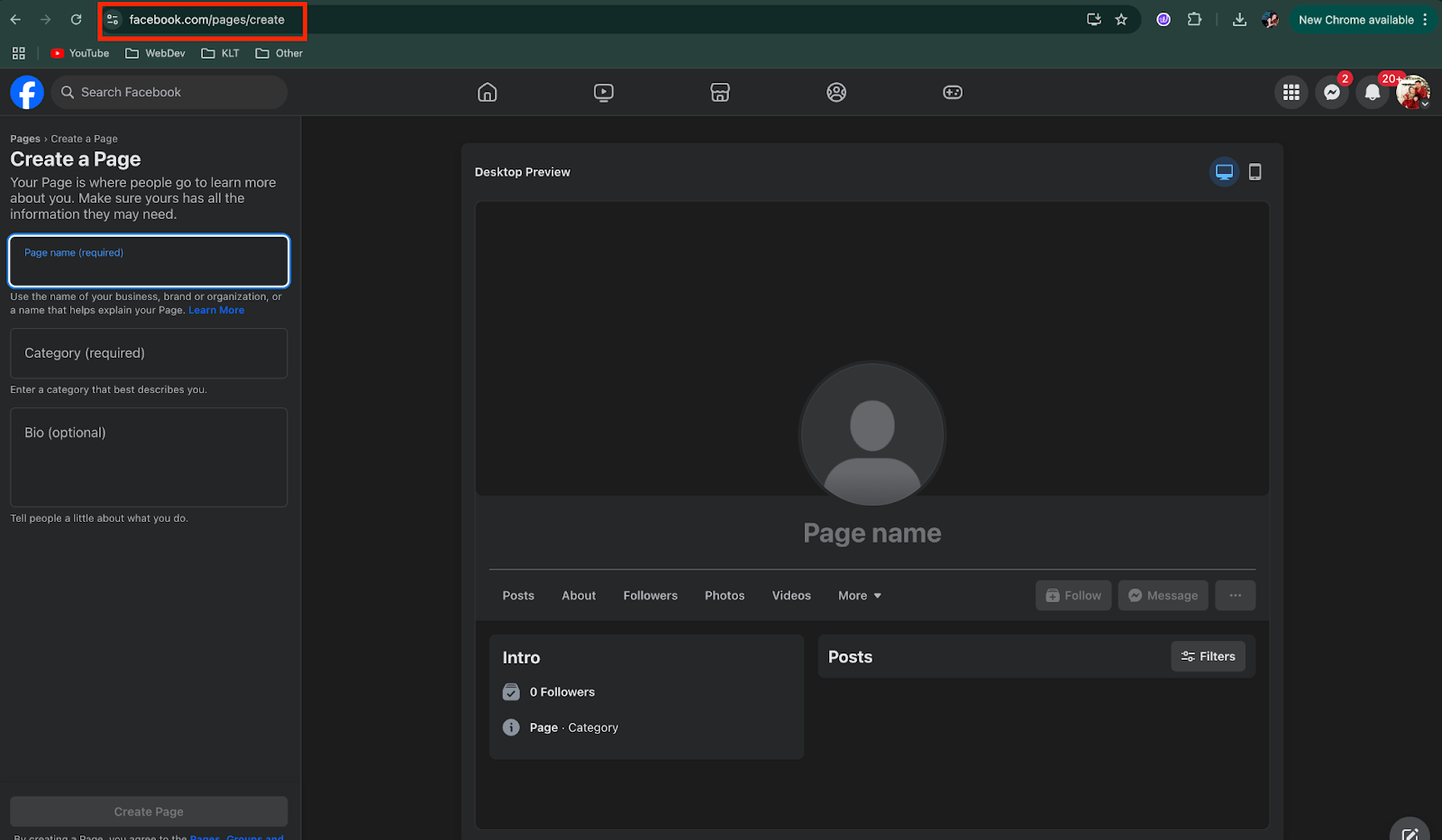
Step 3: Enter Your Page Information
Here’s where you really set the stage for your business:
- Page name: Use your business name so customers can easily find you.
- Category: Start typing and choose the category that fits your business best (e.g., “Home Services,” “Retail,” “Consulting”, etc.).
- Description: Add a short, engaging summary of your business (e.g., “Providing top-notch landscaping services in Springfield since 2005”).
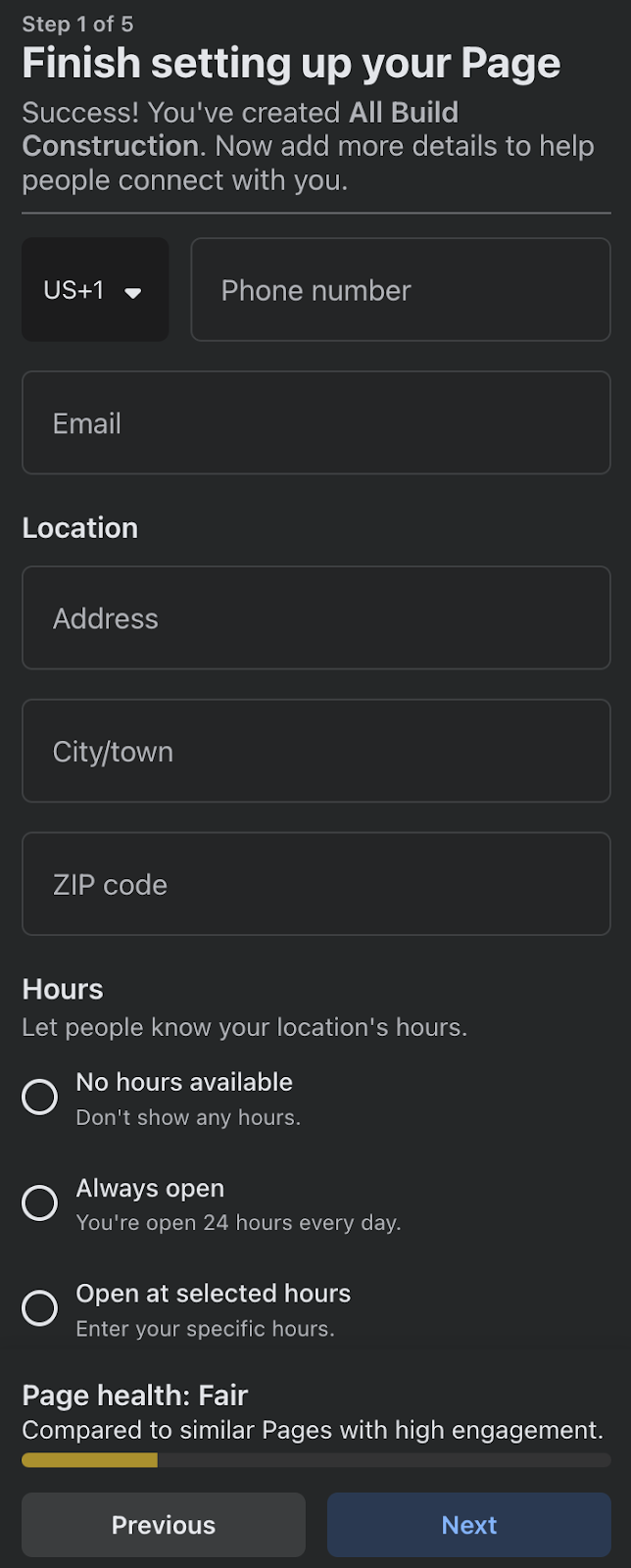
Click “Create Page” to save this info.

Pro tip: Keep your description simple and focus on what makes your business special.
Step 4: Add Profile and Cover Photos
Your visuals matter! They truly do. Need proof? According to Hubspot, your content can generate up to 94% more views if you add compelling visual elements and graphics.
Make sure to add at the very least a:
- Profile picture: Upload your business logo or a clear photo that represents your brand.
- Cover photo: Use a banner image that showcases your business—a storefront, team photo, or even a project you’re proud of.
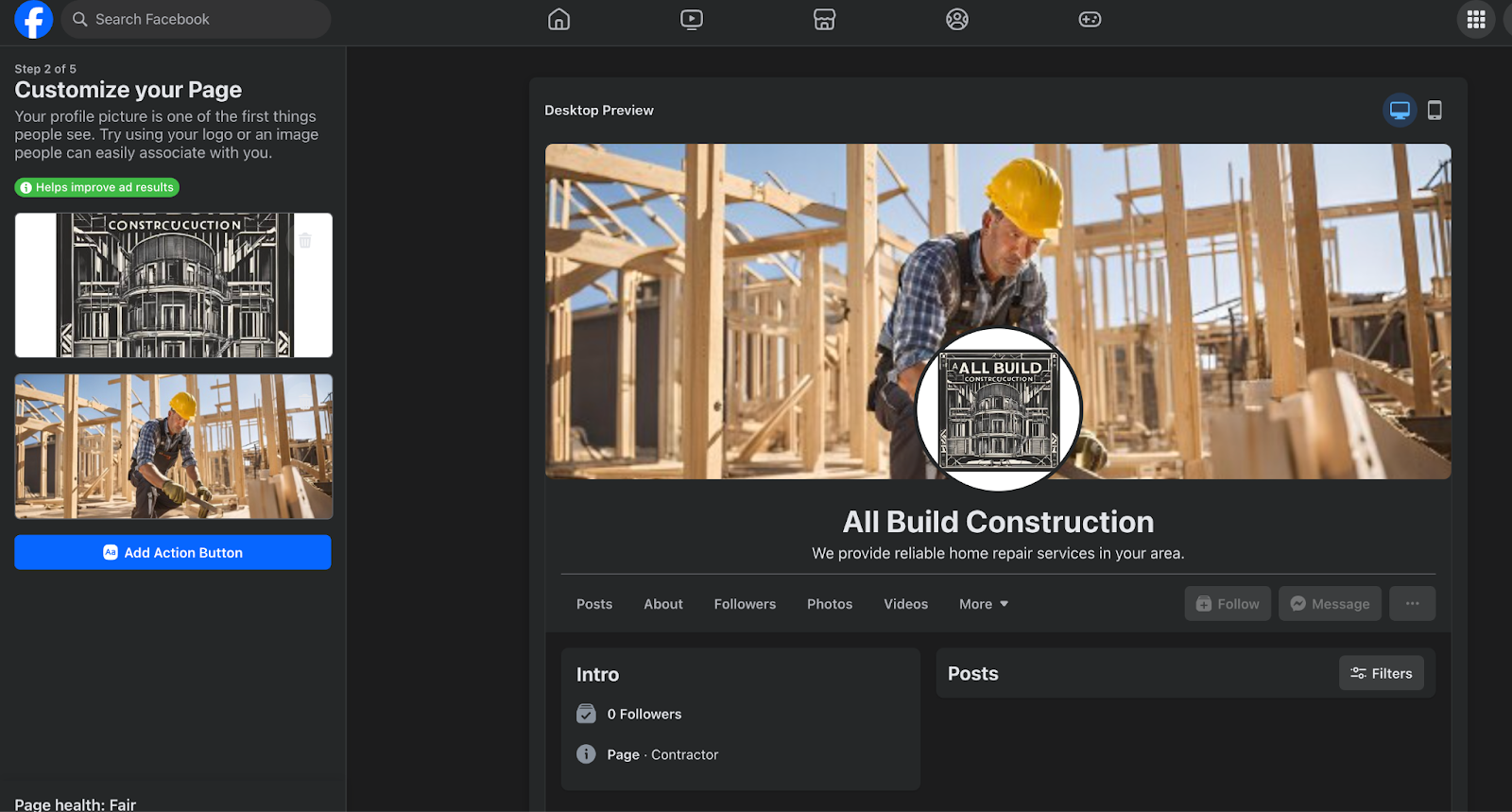
Keep in mind that these photos are the very first things customers see, so make sure they’re high-quality AND eye-catching.
Step 5: Complete Your Page Details
Click on the “About” section to fill in all the important details:
- Contact info: Add your phone number, email and website so customers can reach you easily.
- Location: If you have a physical store, include your address.
- Hours: Let people know when you’re open.
- Other info: Add anything else customers might need to know; like whether you offer free estimates or same-day service.
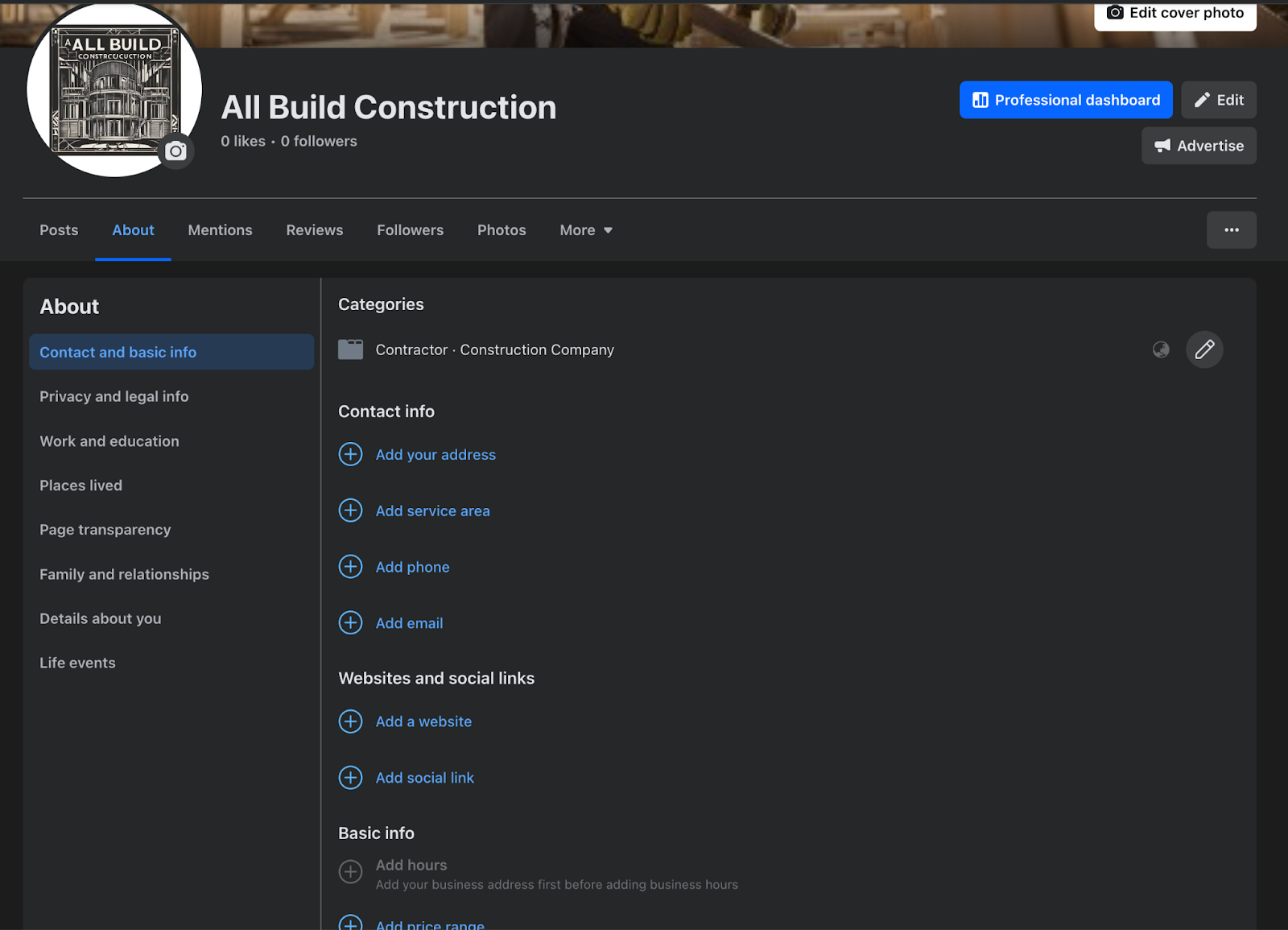
This matters because your Facebook page essentially acts as a digital business card. The more complete your info, the easier you make it for customers to choose you.
Step 6: Adjust Your Settings
Click on “Settings” in the top corner of your page and make a few tweaks:
- Privacy: Control who can post on your page.
- Messaging: Turn on instant replies to let customers know you’ll get back to them quickly.
- Notifications: Choose how and when you want to be alerted about activity on your page.

These are small adjustments but they help you look professional and responsive.
Step 7: Spread the Word
Your page is live! Now, it’s time to let people know!
- Click “Invite Friends” to ask your personal Facebook contacts to like your page.
- Share your page link via email, text or other social media platforms.
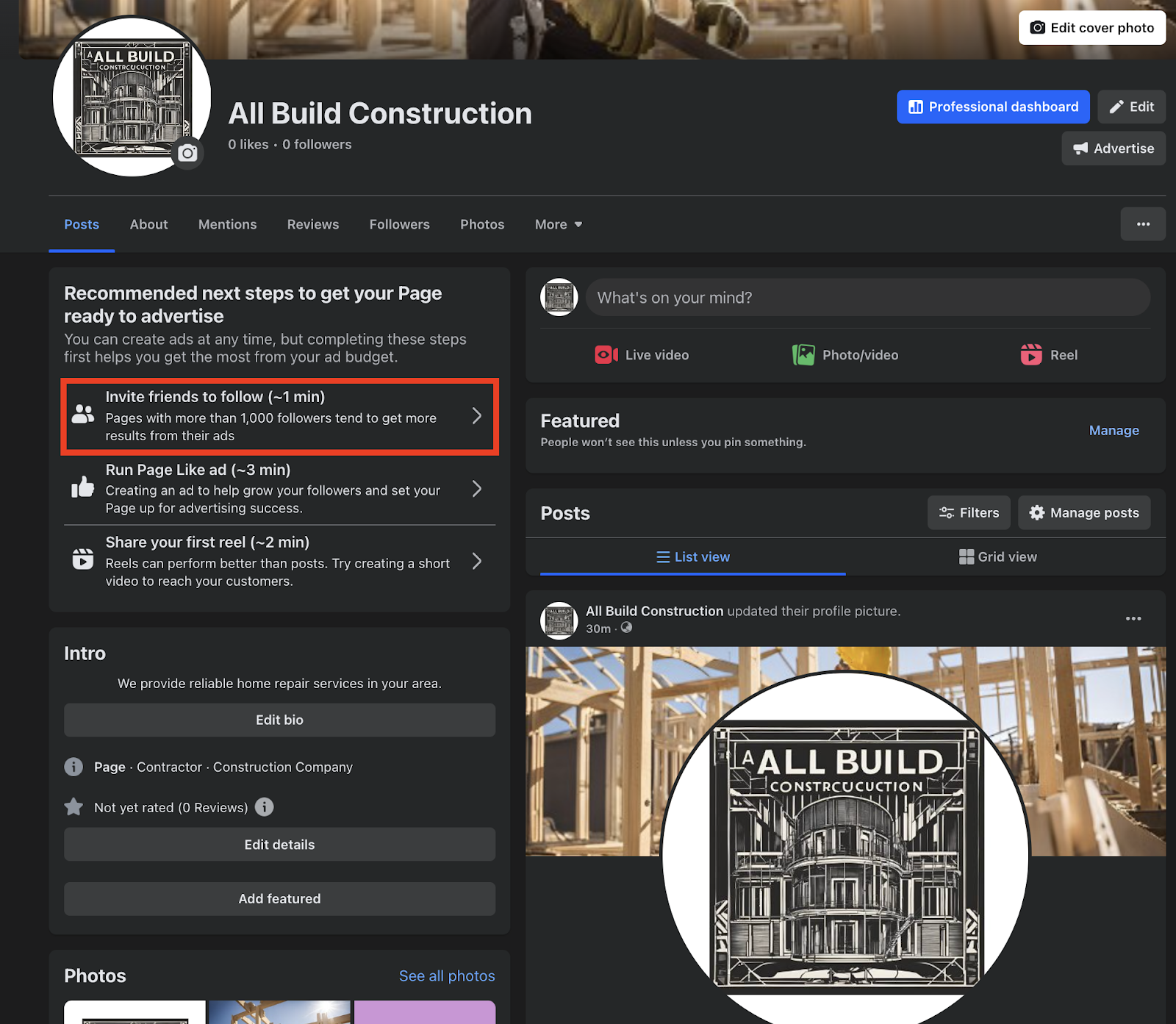

Pro tip: There’s no shame in inviting people to like your business page! You’re leveraging these connections to broaden your reach. Keep in mind that some of your friends may become potential clients, collaborators or help spread the word about your services or products.
Step 8: Connect to the Olly Olly App
Already using the Olly Olly app? That’s awesome! Make your life even easier by linking your Facebook Business Page to your account.
Need help? Check out this guide.
Step 9: Create Your First Post
Use Olly Olly’s social media planner to create a great first post: introduce your business, share a special offer or simply say hello to your audience.
Need guidance? Check out this guide.
Why Having a Facebook Business Profile Matters
A Facebook Business Profile isn’t just another online page, it’s a fantastic way to naturally pop into the newsfeed of the people who need your services most and interact with them.
Imagine someone in your area looking for a plumber, landscaper or a local diner. They might stumble upon your page, see glowing reviews and make a mental note. And the day they need services like yours, that’s exactly what might make them decide to call you over the competition!
Did you know there are more than 253.5 million active users on Facebook in 2025? Having a profile makes your business visible where they already spend their time.
With a Facebook Business Profile, you can:
- Build trust: Customers can see your reviews, photos and updates, helping them feel confident in choosing your business.
- Promote your services: Share projects, seasonal promotions or new offerings with ease.
- Engage your audience: Respond to inquiries and comments in real time, strengthening your relationship with potential clients.
Simply put, it’s a free tool to get more calls and sales.
We’re Here to Help
At Olly Olly, we know small business owners juggle countless tasks every day… Managing your online presence shouldn’t be one of them!
Need help creating, optimizing, or managing your Facebook Business Page? Call us at 877-Olly-Olly, and we’ll guide you every step of the way or schedule a call with your Account Manager!
Our Commitment to You
At Olly Olly, we believe in ethical, effective marketing strategies tailored to your business. Whether you’re an independent contractor, a shop owner, or a consultant, we’re dedicated to helping your business get found online and then chosen.
We never cut corners. We don’t overpromise. We deliver measurable results that last.
