Step 1
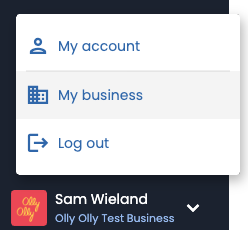
Click where your name and business name are showing in the bottom left of the menu and select “My business” from the drop down
Step 2
Locate the Business Information you would like to update, make any edits, and click on “Save Changes”

From the “My Business” page you are able to edit your:
- Business Name
- Business Address
- Business Logo
- Business Email
- Business Phone
- Business Website
As well as:
- View the available roles and permissions
- Add and edit tags that can be applied to leads
Need Help?
At Olly Olly, we’re here to help your business succeed. If you’re feeling stuck or need a hand, we’re just a call away. Your account manager is ready to walk you through each step so you can get back to doing what you do best—running your business! Schedule a call with your Account Manager now!